
Info
 Home Page Articles Software Goodies
Explanations
How do they do that? The Web in FocusResources
Web Site Stuff Tech Books E-Books Tech Toys Web Hosting LinksWomen
Opinion Tech Women Women's StudiesTech News
Computer Security Databases Java Linux MP3 PC Software Robotics Site Owner Tech Latest Web Development XMLSpread the Word
Newsletter
Recommend this Page
Site Info
Legal Disclaimer
Privacy
Contact
Lighter Side
Crazy for Life crazy for romance Crazy for Kitties Crazy for Dogs Crazy for CowsCopyright 2000-2001, hertechnology.com
Applet Marquee Wizard
Fire up Applet Marquee Wizard. You will get a window that allows you to set parameters for your slide show. First, size the marquee to match your photos' pixel size. Choose the border color, size, and frame type. This is the border that appears around your photo on each slide.
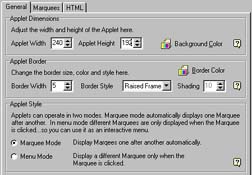
The Applet Marquee Wizard Options
Now click on the Marquee tab. Click New Marquee to create the first slide. You will get an Untitled Marquee icon in the window. Right click on the Untitled Marquee icon to rename it. Double click on the Untitled Marquee icon to bring up the properties window for that particular slide.
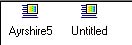
Slide Icons for the Slides
Want to bookmark this site? Press
Control-D. (Hold down the control key and the letter D at the same time.)